


Checkers & Rally's Rewards
4.76.01K Reviews
App Specs
- Version
- 2.59.0
- Updated On
- License
- Free
- Downloads
- 1,000,000+
- Developer
- Checkers Drive-In Restaurants, Inc.
- Categories
- Food & Drink
- Platform
- Android, iOS
Screenshots
 Analysis by AppCompare
I treat a restaurant rewards app as worthwhile only when it helps with a visit I was already planning. A discount can be appealing, but it matters just as much whether ordering feels clear, the location suits my route, and the app is useful without turning a quick meal into a project. Checkers & Rally's Rewards is most compelling for people who already choose Checkers or Rally’s and want rewards, ordering, and delivery options in one place.
That focus also sets a sensible expectation: this is a companion for those restaurants, not a general-purpose food finder. If I’m choosing between several nearby places or looking for the widest range of cuisines, a broader restaurant or delivery app is the more natural starting point. If I already know I want Checkers or Rally’s, opening this app first makes more sense.
Decide by how you actually eat
Before installing, I’d ask myself how often I visit these restaurants and whether I prefer to order ahead or decide at the counter. Frequent customers have more reason to keep a dedicated rewards app handy; occasional visitors may still find an offer or a faster pickup workflow useful, but the benefit depends on what is available when they open it.
It is a free Food & Drink app from Checkers Drive-In Restaurants, Inc., with an Everyone age rating. Its average rating is 4.7 from around 21,000 ratings, and it has over a million installs. Those figures suggest it has found an audience, though they cannot tell me whether a particular restaurant near me supports the option I want or whether the current offers suit my order.
For a practical test, I’d install it before a visit rather than while standing in a queue. I’d check the restaurant options, look through the menu and available offers, and see whether the order I want can be completed the way I expect. That small trial helps answer the useful question: does it fit my routine, rather than merely sound convenient?
Where the dedicated app earns its place
The strongest case is having restaurant-specific rewards and ordering together. I can check for a relevant offer before choosing what to eat, then decide whether placing the order in advance is worthwhile. That is more direct than searching email or general coupon pages for a deal, especially when I already have a particular Checkers or Rally’s meal in mind.
A useful habit is to review the offer before building an order around it. Deals can shape what looks like a good value, but only if I actually want the qualifying food. I wouldn’t add something I didn’t plan to buy just because it appears discounted; the better use is matching an available offer to a meal I would have chosen anyway.
Worth Reading Before You Choose

EA SPORTS FC Mobile 26 Is a Bigger Football Game, but It Takes Time

Flipboard Shows What News Apps Must Do Beyond the Feed

Switching to Android Auto Means Rethinking Your Driving Routine

Google Calendar Makes a Crowded Week Easier to Manage

Ludo King Makes the Most of the Minutes Between Plans

Baby Panda World Brings Quick Play to Modern Phones, but Its Game Library Feels Busy
Ordering ahead can also help me plan a stop around an existing trip. If I’m driving past a location on the way home, I can check the menu and arrange pickup before I arrive instead of making the stop a longer decision. The trade-off is that mobile ordering is most useful when I know where I’m going and what I want; it is less helpful if I’m still comparing places or changing plans.
When another option may suit you better
For someone who visits Checkers or Rally’s only rarely, the app may not deserve a permanent spot on the home screen. A general delivery service can be a better fit when the priority is comparing multiple restaurants, while ordering in person remains simpler if I want to ask questions or make a last-minute choice. The dedicated app is at its best when the restaurant decision is already made.
Delivery is part of the app’s stated purpose, but I’d check what is presented for my intended location and order rather than assume the same choices will suit every visit. A pickup plan and a delivery plan solve different problems: pickup works around a route I control, while delivery is more convenient when I’m staying put. Choosing between them should come before I start building the order.
Make the first visit a low-risk trial
My practical approach would be to create an account when I have a real meal in mind, browse the available menu and rewards, and place a modest order only if the details look right. That lets me learn the flow without relying on the app for an urgent meal. I’d also check the selected restaurant and order details before submitting; a few seconds of review are worthwhile whenever a pickup or delivery plan depends on getting the right location.
The app is currently at version 2.47.0 and requires Android 8.0 or later. It is free to install, but I’d still judge its value by whether the rewards and ordering options suit my habits, not by the download price alone. The app has been available since December 14, 2020, so it is an established restaurant companion rather than a brand-new experiment.
My recommendation is clearest for regular Checkers and Rally’s customers who want to check offers and place orders from their phone. I’d be more cautious if I rarely eat there, prefer browsing across many restaurants, or usually make spontaneous counter orders. In those cases, a broader alternative—or simply ordering directly in person—may fit better.
If you’re anything like me, you love a good deal, especially when it involves food. That’s why I was pretty excited to try out the Checkers & Rally's Rewards app. I’m going to take you through my experience with it, so you can decide if it’s worth the download.
Getting Started with Checkers & Rally's Rewards
First things first, downloading the app is a breeze. It’s available on both Android and iOS, so whether you’re an Apple aficionado or an Android advocate, you’re covered. Once you’ve got it installed, you’ll need to create an account. It’s all pretty standard stuff—email, password, and a bit of personal info. No sweat.
Once you’re in, the app greets you with a clean and straightforward interface. I appreciate apps that don’t try to do too much right off the bat. Here, you’re immediately drawn to the main features without getting lost in a sea of options.
Exploring the Features
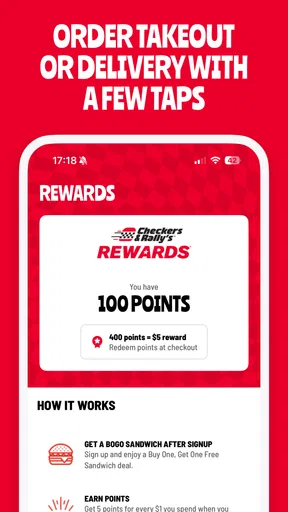
So, what’s inside? Well, the Checkers & Rally's Rewards app is packed with features designed to enhance your fast-food experience. The biggest draw is the rewards system, of course. Every dollar you spend earns you points, which you can later redeem for free food. Who doesn’t love free food?
On top of that, the app offers exclusive deals and discounts. I found a couple of sweet deals on burgers and fries that I wouldn’t have known about otherwise. They update these offers regularly, so there’s always something new to try. Plus, having these deals only a tap away means I can save some cash without having to dig through coupons or emails.
Ordering Made Easy
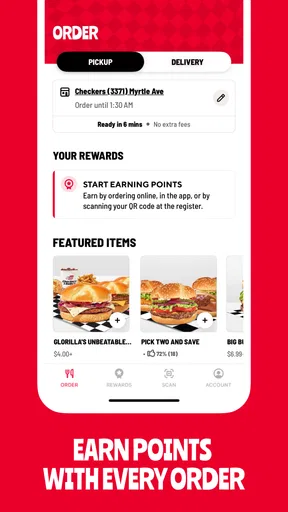
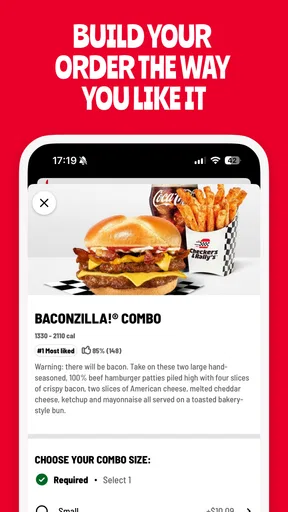
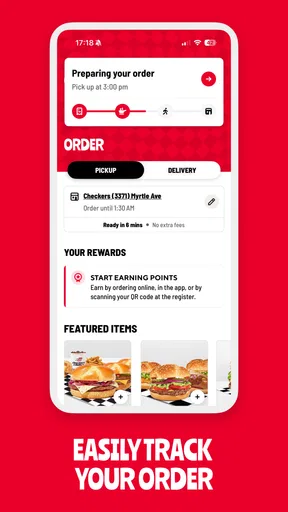
Another handy feature is mobile ordering. Let’s be honest—no one wants to stand in line if they don’t have to. With the app, you can customize your order exactly how you like it and then swing by your nearest location to pick it up. I gave it a try, and it worked like a charm. My order was ready when I arrived, and the staff was friendly and efficient.
For example, if I’m leaving work and expect to pass a restaurant on the way home, I can use the drive to decide what I want, then place the order once I’m ready to commit. I would still pause to verify the selected location and the finished order before checkout. That is a small but useful safeguard: the convenience of ordering ahead depends on sending the meal to the place I actually plan to visit, not simply the first location that appears.
For a family meal or a group pickup, I’d use the same approach but settle everyone’s choices before placing the order. Customization is handy when one person wants a different version of a meal, yet making several changes while rushing can make the final review more important. I’d treat the confirmation screen as a checklist: location, items, modifications, and whether pickup or delivery is the intended plan.
Navigation and Usability
As for usability, the app is intuitive and user-friendly. The layout is simple, and everything is where you’d expect it to be. The menu is easy to navigate, and the checkout process is smooth. I didn’t encounter any lag or crashes, which is always a plus. Nobody wants to deal with a buggy app when they’re hungry.
The app’s convenience is most noticeable when I have a predictable order, because I can move through familiar choices without starting the decision from scratch. If I’m trying something new, I’d give myself a little more time to read the menu and inspect any available offer rather than assuming the quickest route is automatically the best value. In other words, it works as a shortcut once I know what I want, but it need not replace taking a moment to choose.
If a deal catches my eye, I’d compare it with the order I would have placed without the deal. That is a more reliable way to judge savings than looking only at the discount. A restaurant offer can be genuinely useful when it fits a planned meal; if it nudges me toward extra food I wouldn’t otherwise buy, the apparent bargain is less meaningful.
If you’re concerned about privacy, the app has it covered. During the sign-up, they explain how your data is used, and you can adjust your preferences in the settings. It’s nice to see transparency on that front.
Account creation is a reasonable first step for someone who expects to use rewards or mobile ordering, but an occasional visitor may prefer to look around before deciding whether to keep the app. I’d avoid treating the sign-up itself as proof that it will be useful: the real test is whether the available restaurant choices, ordering flow, and offers match the way I eat. If they do, the account can make repeat visits easier; if not, there is little reason to force it into my routine.
Final Thoughts
So, is the Checkers & Rally's Rewards app worth your time? If you’re a fan of Checkers & Rally's, it’s a no-brainer. The rewards system alone makes it worthwhile, and the convenience of mobile ordering is a game-changer. Plus, the exclusive deals can save you some serious cash.
The app is friendly, efficient, and doesn’t overwhelm you with unnecessary features. It’s all about making your fast-food experience smoother and more rewarding. If you haven’t already, give it a shot. You might find yourself snagging a free burger sooner than you think!
A routine-friendly choice, with a clear limit
I’d keep this app if Checkers or Rally’s is already part of my usual rotation, especially when I often order the same kinds of meals or want to check for an offer before I leave. It brings the brand-specific parts of the visit together, which is useful in a way that a general restaurant browser cannot quite replicate. The payoff is less about exploring food in general and more about making a chosen stop easier to manage.
On the other hand, I wouldn’t recommend it as a replacement for every food app or every way of ordering. People who want to compare restaurants side by side, discover unfamiliar cuisines, or make a decision only after speaking with staff may be happier with a broad platform or an in-person order. The app narrows the choice to Checkers and Rally’s by design, and that is a strength only when that is where you want to eat.
What to check before relying on it
A sensible first use is a planned visit with enough time to explore. Check the location you intend to use, see which ordering path is available for that visit, and review the order before sending it through. I would not wait until the last moment to learn the interface if I were coordinating a tight stop; opening it earlier gives me room to change course if the menu, offer, or location does not suit the plan.
It is also worth separating rewards from discounts in your own decision-making. A reward balance can be a reason to return, while a current offer can influence what seems attractive today. I’d look at each separately and avoid counting on a future reward to justify spending more than I planned. That keeps the app useful as a budgeting aid rather than turning every visit into a chase for points.
For delivery, I’d make the same deliberate check of the available choices and final details before confirming. Delivery can be the more comfortable option when I’m not heading past a restaurant, but pickup is often the simpler fit when a location lies on my route. Neither is automatically better: I’d choose based on where I’ll be and how much control I want over the stop.
Overall, I see this as a focused tool for turning a Checkers or Rally’s visit into a more organized one. Its rewards and mobile ordering are most valuable when they support a meal I already intend to buy, and its straightforward presentation helps keep that process from feeling complicated. If that describes your routine, I’d try it; if you mainly want a broad directory or seldom visit either brand, I’d skip the extra app and use the option that already fits your habits.
Pros
- Easy-to-use interface enhances user experience.
- Exclusive deals and offers for app users.
- Earn points quickly for free food rewards.
- Seamless ordering and payment options.
- Location-based services for nearest outlets.
Cons
- Limited customization in order preferences.
- Occasional app glitches during peak times.
- Requires constant internet connection.
- Some features are location-restricted.
- Notifications can be overly frequent.
FAQs for Checkers & Rally's Rewards
What is the Checkers & Rally's Rewards app?
The Checkers & Rally's Rewards app is a convenient tool for fans of the popular fast-food chains to access exclusive deals, earn rewards, and place orders directly from their mobile devices. It offers a seamless experience with features like mobile ordering, personalized offers, and location-based services.
How do I earn rewards using the app?
Earning rewards with the Checkers & Rally's Rewards app is simple. Every time you make a purchase through the app, you earn points. These points can be redeemed for free menu items or discounts on future purchases. The app tracks your points automatically, ensuring you never miss out on rewards.
Can I use the app to place an order for delivery?
Yes, the app supports both pickup and delivery options. You can browse the menu, customize your order, and choose whether you want it delivered to your doorstep or ready for pickup at your nearest Checkers or Rally's location. Delivery availability may vary based on your location.
Is the Checkers & Rally's Rewards app free to download and use?
Absolutely, the app is free to download on both Android and iOS platforms. There are no hidden fees for using the app to access deals or earn rewards. However, standard charges apply for food orders, and delivery fees may apply if you choose to have your order delivered.
What should I do if I encounter issues with the app?
If you encounter any issues while using the Checkers & Rally's Rewards app, you can contact their customer support directly within the app or via their official website. They offer assistance for technical problems, account inquiries, and any other concerns to ensure a smooth user experience.


